
Rest Api Deep Dive
REST stands for Representational State Transfer, a term coined by Roy Fielding in 2000. It is an architecture style for designing loosely coupled applications over HTTP, that is often used in the development of web services.
REST does not enforce any rule regarding how it should be implemented at lower level, it just put high level design guidelines and leave you to think of your own implementation.
Architectural Constraints
REST defines 6 architectural constraints which make any web service – a true RESTful API.
Uniform Interface
Client-Server
Stateless
Cacheable
Layered System
Code on demand(optional)
Each request from the client must contain all information needed to process it. The server should not store client session state between requests.
No client context shall be stored on the server between requests. The client is responsible for managing the state of the application. Responses should indicate whether they can be cached.
Well-managed caching partially or completely eliminates some client-server interactions, further improving scalability and performance.
Caching REST Api Response
Caching is the ability to store copies of frequently accessed data in several places along the request-response path. When a consumer requests a resource representation, the request goes through a cache or a series of caches (local cache, proxy cache or reverse proxy) toward the service hosting the resource. If any of the caches along the request path has a fresh copy of the requested representation, it uses that copy to satisfy the request. If none of the caches can satisfy the request, the request travels all the way to the service (or origin server as it is formally known).
Using HTTP headers, an origin server indicates whether a response can be cached and if so, by whom, and for how long. Caches along the response path can take a copy of a response, but only if the caching metadata allows them to do so.
Optimizing the network using caching improves the overall quality-of-service in following ways:
Reduce bandwidth
Reduce latency
Reduce load on servers
Hide network failures
Caching in REST APIs
Being cacheble is one of architectural constraints of REST. GET requests should be cacheable by default – until special condition arises. Usually, browsers treat all GET requests cacheable. POST requests are not cacheable by default but can be made cacheable if either an Expires header or a Cache-Control header with a directive, to explicitly allows caching, is added to the response. Responses to PUT and DELETE requests are not cacheable at all.
There are two main HTTP response headers that we can use to control caching behavior:
1) Expires
The Expires HTTP header specifies an absolute expiry time for a cached representation. Beyond that time, a cached representation is considered stale and must be re-validated with the origin server. To indicate that a representation never expires, a service can include a time up to one year in the future.
Expires: Fri, 20 May 2016 19:20:49 IST2) Cache-Control
The header value comprises one or more comma-separated directives. These directives determine whether a response is cacheable, and if so, by whom, and for how long e.g. max-age or s-maxage directives.
Cache-Control: max-age=3600Cacheable responses (whether to a GET or to a POST request) should also include a validator — either an ETag or a Last-Modified header.
ETag
An ETag value is an opaque string token that a server associates with a resource to uniquely identify the state of the resource over its lifetime. When the resource changes, the ETag changes accordingly.
ETag: "abcd1234567n34jv"Last-Modified
Whereas a response’s Date header indicates when the response was generated, the Last-Modified header indicates when the associated resource last changed. The Last-Modified value cannot be later than the Date value.
Last-Modified: Fri, 10 May 2016 09:17:49 ISTRESTful Web Services – Security
There are multiple ways to secure a RESTful API e.g. basic auth, OAuth etc. but one thing is sure that RESTful APIs should be stateless – so request authentication/authorization should not depend on cookies or sessions. Instead, each API request should come with some sort authentication credentials which must be validated on the server for each and every request.
Following are the best practices to be adhered to while designing a RESTful Web Service −
Validation − Validate all inputs on the server. Protect your server against SQL or NoSQL injection attacks.
Session Based Authentication − Use session based authentication to authenticate a user whenever a request is made to a Web Service method.
No Sensitive Data in the URL − Never use username, password or session token in a URL, these values should be passed to Web Service via the POST method.
Restriction on Method Execution − Allow restricted use of methods like GET, POST and DELETE methods. The GET method should not be able to delete data.
Validate Malformed XML/JSON − Check for well-formed input passed to a web service method.
Throw generic Error Messages − A web service method should use HTTP error messages like 403 to show access forbidden, etc.
Consider Adding Timestamp in Request
Use https
Pathparam
->/ewmployee/{id}/
QueryParam(key value pair)
> /employee?id=2&name=test
REST Resource Representation Compression
Compression, like encryption, is something that happens to a representation in transit and must be undone before the client can use the representation.
Accept-Encoding
client sends an Accept-Encoding header that says what kind of compression algorithms the client understands.
The two standard values for Accept-Encoding are compress and gzip.
GET /employees HTTP/1.1Host: www.domain.comAccept: text/htmlAccept-Encoding: gzip,compressIf an Accept-Encoding field is present in a request, and if the server cannot send a response which is acceptable according to the Accept-Encoding header, then the server SHOULD send an error response with the 406 (Not Acceptable) status code.
Content-Encoding
If the server understands one of the compression algorithms from Accept-Encoding, it can use that algorithm to compress the representation before serving it. When successfully compressed, server lets know the client of encoding scheme by another HTTP header i.e. Content-Encoding.
200 OKContent-Type: text/htmlContent-Encoding: gzip Other Example:
Content-Encoding: gzip
Content-Encoding: compress
Content-Encoding: deflate
Content-Encoding: identity
Content-Encoding: br
identity: It is used to indicate that there is no compression.
br encoding: Just like gzip, Brotli is also a compression algorithm. It is developed by Google and serves best for text compression. The reason being, it uses a dictionary of common keywords and phrases on both client and server side and thus gives a better compression ratio.
Gzip vs Brotli: The advantage for Brotli over gzip is that it makes use of a dictionary and thus it only needs to send keys instead of full keywords. According to certsimple,
Javascript files compressed with Brotli are 14% smaller than gzip.
HTML files are 21% smaller than gzip.
CSS files are 17% smaller than gzip.
Client ------------------------------------------------------------à server(Request)Accept-Encoding:gzip,compress if server understands gzip compression(Response)Content-Encoding: gzip
(Request)Accept-Encoding:br if server Don’t understands br compression(Response)415
If the content-coding of an entity in a request message is not acceptable to the origin server, the server SHOULD respond with a status code of 415 (Unsupported Media Type). If multiple encodings have been applied to an entity, the content encodings MUST be listed in the order in which they were applied.
· 406 if an Accept header was sent you cannot fulfil.
· 415 if a Content-Type is sent you cannot use.
Accept indicates what kind of response from the server the client can accept. Content-type always is about the content of the current request or response.
REST – Content Negotiation
HTTP has provisions for several mechanisms for “content negotiation” — the process of selecting the best representation for a given response when there are multiple representations available.
Server-driven Vs Agent-driven Content Negotiation
If the selection of the best representation for a response is made by an algorithm located at the server, it is called server-driven negotiation. If that selection is made at agent or client side, it’s called agent-driven content negotiation.
HTTP POST
Generally – not necessarily – POST APIs are used to create a new resource on server. So when you invoke the same POST request N times, you will have N new resources on the server. So, POST is not idempotent.
HATEOAS (Hypermedia as the Engine of Application State) specifies that the REST API’s should provide enough information to the client to interact with the server. This is different from the SOA (Service-Oriented Architecture) where a client and a server interact through a fixed contract. We’ll look more into HATEOAS in a while.
{ "departmentId": 10, "departmentName": "Administration", "locationId": 1700, "managerId": 200, "links": [{ "href": "10/employees", "rel": "employees", "type" : "GET" }]}PUT vs PATCH
the existing HTTP PUT method only allows a complete replacement of a document. This proposal adds a new HTTP method, PATCH, to modify an existing HTTP resource.
What is Bulkhead Pattern used by Hystrix?
Hystrix, a Netflix API for latency and fault tolerance in complex distributed systems uses Bulkhead Pattern technique for thread isolation.
In general, the goal of the bulkhead pattern is to avoid faults in one part of a system to take the entire system down. The term comes from ships where a ship is divided in separate watertight compartments to avoid a single hull breach to flood the entire ship; it will only flood one bulkhead.
Implementations of the bulkhead pattern can take many forms depending on what kind of faults you want to protect the system from. I will only discuss the type of faults Hystrix handles in this answer.
I think the bulkhead pattern was popularized by the book Release It! by Michael T. Nygard.
What Hystrix Solves
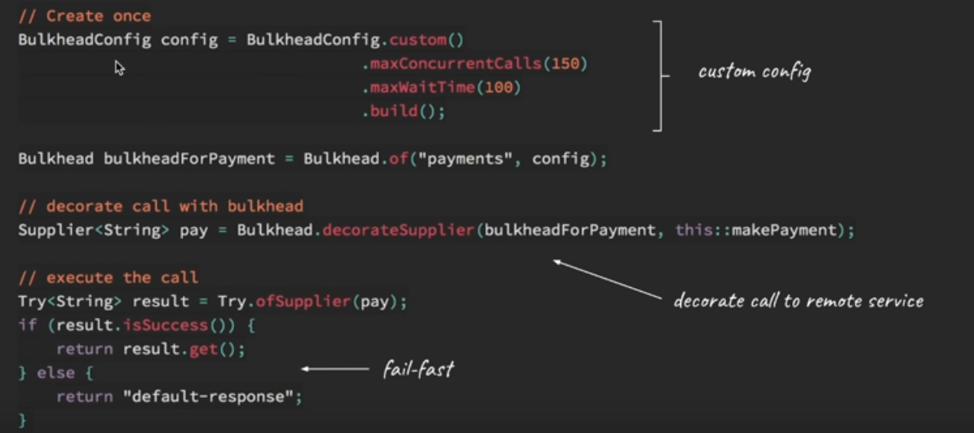
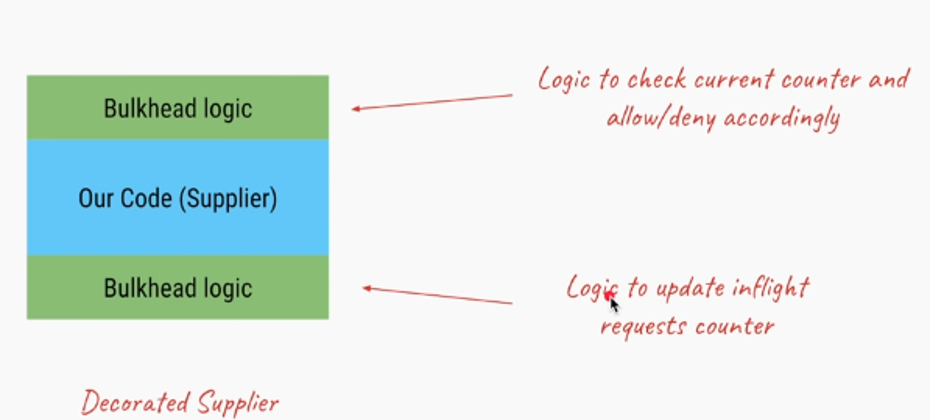
The bulkhead implementation in Hystrix limits the number of concurrent calls to a component. This way, the number of resources (typically threads) that is waiting for a reply from the component is limited.
Assume you have a request based, multi-threaded application (for example a typical web application) that uses three different components, A, B, and C. If requests to component C starts to hang, eventually all request handling threads will hang on waiting for an answer from C. This would make the application entirely non-responsive. If requests to C is handled slowly we have a similar problem if the load is high enough.
Hystrix' implementation of the bulkhead pattern limits the number of concurrent calls to a component and would have saved the application in this case. Assume we have 30 request handling threads and there is a limit of 10 concurrent calls to C. Then at most 10 request handling threads can hang when calling C, the other 20 threads can still handle requests and use components A and B.
Hystrix' approaches
Hystrix' has two different approaches to the bulkhead, thread isolation and semaphore isolation.
Thread Isolation
The standard approach is to hand over all requests to component C to a separate thread pool with a fixed number of threads and no (or a small) request queue.
Semaphore Isolation (limit the access by having semaphore count)
The other approach is to have all callers acquire a permit (with 0 timeout) before requests to C. If a permit can't be acquired from the semaphore, calls to C are not passed through.
What is semaphore
In computer science, a semaphore is a variable or abstract data type used to control access to a common resource by multiple processes in a concurrent system such as a multitasking operating system.
Differences
The advantage of the thread pool approach is that requests that are passed to C can be timed out, something that is not possible when using semaphores.
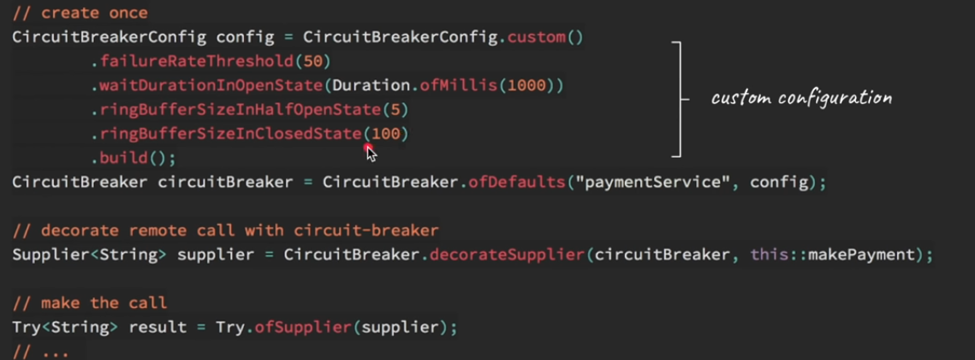
@EnableCircuitBreaker
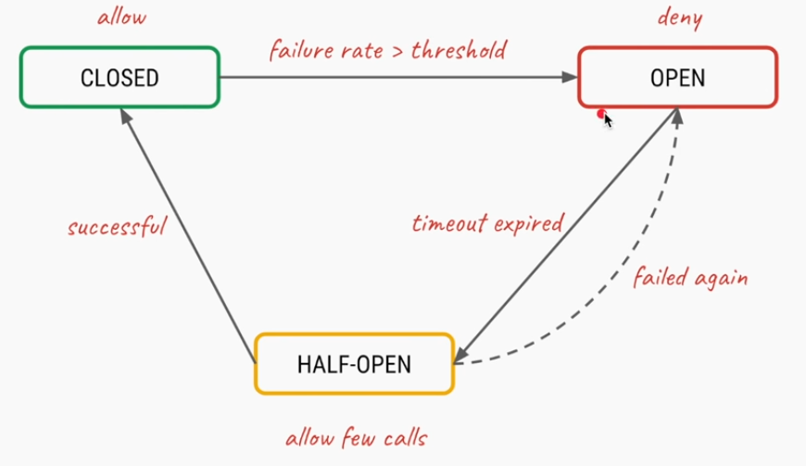
That’s necessary to tell Spring Cloud that the Reading application uses circuit breakers and to enable their monitoring, opening, and closing (behavior supplied, in our case, by Hystrix).
@HystrixCommand(fallbackMethod = "reliable")

Oath 2.0
OAuth (or Open Authorization) is a framework that gives users the ability to grant access to their information stored in one place, from another place. For example, granting Spotify access to your Facebook profile. OAuth (Open Authorization) is a simple way to publish and interact with protected data.
It is an open standard for token-based authentication and authorization on the Internet. It allows an end user's account information to be used by third-party services, such as Facebook, without exposing the user's password.
The OAuth specification describes five grants for acquiring an access token:
Authorization code grant: - The Authorization Code grant type is used by web and mobile apps. Since the Authorization Code grant has the extra step of exchanging the authorization code for the access token, it provides an additional layer of security not present in the Implicit grant type.
Implicit grant: - The Implicit grant type is a simplified flow that can be used by public clients, where the access token is returned immediately without an extra authorization code exchange step.
Resource owner credentials grant: - The resource owner password credentials (i.e., username and password) can be used directly as an authorization grant to obtain an access token. The credentials should only be used when there is a high degree of trust between the resource owner and the client
Client credentials grant: - The Client Credentials grant type is used by clients to obtain an access token outside of the context of a user.
Refresh token grant
Authorization code grant provides an additional layer of security not present in the implicit grant type.
In this tutorial we will be using Authorization code grant.
What actually is OAuth?
Consider the use case of Quora. Go to Quora.com.
If you are a new user you need to signup. You can signup using google or facebook account. When doing so you are authorizing Google or Facebook to allow quora to access you profile info with Quora. This authorizing is done using OAuth. Here you have in no way shared your credentials with Quora.

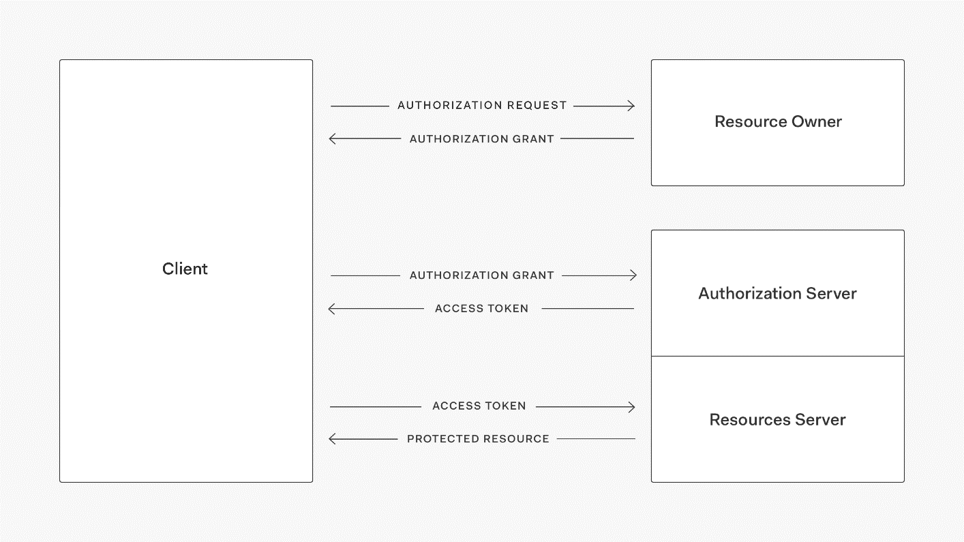
In the above example of Quora, we have 3 actors-
Resource Owner - This is the user who wants to sign up using Quora.
Client Application - This will be Quora
Resource Server - This will be Gmail or Facebook.
Authorization Server - The resource server hosts the protected user accounts, and the authorization server verifies the identity of the user then issues access tokens to the application.
In this tutorial we will be implementing our own client application and resource server.
The resource owner will then using OAuth authorize the resource server to share data with the client application.
The client application must first register with the authorization server associated with the resource server. This is usually a one-time task. Once registered, the registration remains valid, unless the client application registration is revoked. At registration the client application is assigned a client ID and a client secret (password) by the authorization server. The client ID and secret is unique to the client application on that authorization server. For example, if we click on Continue with Google, we get the following screen. Here we can see Quora client id.
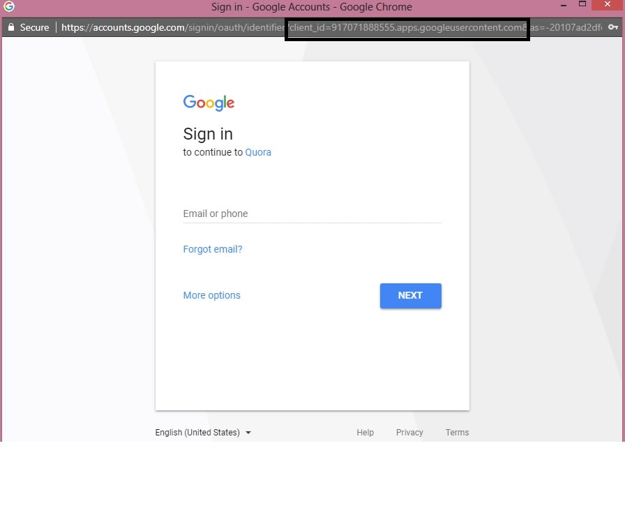
Quora got this client id and a secret key when it registered with Google.
The actual authorization process that takes place between Quora and Google using OAuth is as follows-

Similar to the above flow we will be developing our own client application and Resource Server. Using OAuth the Resource server will then share the data with the client application. Also we will be assuming that the client is already registered with the Resource Server and has been assigned a unique client id and secret key.
Spring Boot Client Application - We already have a unique client id -'javainuse' and secret key - 'secret'. We need to import data from Resource Server.
Resource Server - Using OAuth we configure authorization server. It already has the unique key configured for recognizing our client application.
Grant Type

The most common OAuth 2.0 grant types are listed below.
Authorization Code
Implicit
Password (need to pass clientId, username,userpassword)
Client Credentials (need to pass clientId, Client Secret, )
Device Code
Refresh Token
Throttling
Throttling is a process that is used to control the usage of APIs by consumers during a given period. You can define throttling at the application level and API level. Throttling limit is considered as cumulative at API level.
Administrators and publishers of API manager can use throttling to limit the number of API requests per day/week/month. For example, you can limit the number of total API requests as 10000/day.
When a throttle limit is crossed, the server sends 429 message as HTTP status to the user with message content as "too many requests".
What Are the Types of Throttling?
Rate-Limit Throttling: This is a simple throttle that enables the requests to pass through until a limit is reached for a time interval. A throttle may be incremented by a count of requests, size of a payload, or it can be based on content; for example, a throttle can be based on order totals. This is also known as the API burst limit or the API peak limit.
IP-Level Throttling: You can make your API accessible only to a certain list of whitelisted IP addresses. You can also limit the number of requests sent by a certain client IP.
Scope Limit Throttling: Based on the classification of a user, you can restrict access to specific parts of the API - certain methods, functions, or procedures. Implementing scope limits can help you leverage the same API across different departments in the organization.
Concurrent Connections Limit: Sometimes your application cannot respond to more than a certain number of connections. In such cases, you need to limit the number of connections from a user/account to make sure that other users don't face a DoS (Denial of Service) error. This kind of throttling also helps secure your application against malicious cyberattacks.
Resource-Level Throttling (also referred to as Hard Throttling): If a certain query returns a large result set, you can throttle the request so that your SQL engine limits the number of rows returned by using conditions attributes like TOP, SKIP, SQL_ATTR_MAX_ROWS, etc.
Tiers of Throttling: Throttling can be applied at multiple levels in your organization:
· API-level throttling.
· Application-level throttling.
· User-level throttling.
· Account-level throttling.
Resilience4j is a Java library that helps us build resilient and fault-tolerant applications. It provides a framework for writing code to prevent and handle such issues.
Resilience4j has a simple interface called RateLimiter (obviously) and the main method within it is
1
boolean getPermission(java.time.Duration timeoutDuration);where timeoutDuration is a period you're ready to wait for permission if it's not there yet. This method returns true if a permission was acquired and false if while waiting timeoutDuration elapsed before a permit was acquired.
Currently, we have de-facto standard rate limiting algorithm called "token-bucket," but it comes with different variations and in Resilience4j you can find two implementations: SemaphoreBasedRateLimiter and AtomicRateLimiter
Spring Rate Limiter libraries:
Spring provides several libraries that enable developers to implement rate limiting in their APIs. Some of the popular libraries are:
Spring Cloud Gateway: It’s a library that provides rate limiting capabilities for APIs running behind a gateway. It can limit the number of requests per second, minute, or hour.
Spring Boot Rate Limiter: It’s a library that provides a simple rate limiting mechanism for Spring Boot applications. It can limit the number of requests per second, minute, or hour based on IP address or user ID.
Spring MVC Rate Limiting: It’s a library that provides rate limiting capabilities for Spring MVC applications. It can limit the number of requests per second, minute, or hour based on IP address or user ID.
How many types of rate limiters are there?
There are several types of rate limiters, each with its own strengths and weaknesses. Here are some of the most common types:
a) Fixed Window Rate Limiter: This type of rate limiter divides the time window into fixed intervals and limits the number of requests that can be made within each interval. For example, if the limit is set to 10 requests per minute, the rate limiter would allow 10 requests in each minute interval.
b) Sliding Window Rate Limiter: This type of rate limiter divides the time window into sliding intervals and limits the number of requests that can be made within each interval. The sliding window moves along with time, so requests made earlier in the window are counted towards the limit, even if they fall outside the current interval.
c) Token Bucket Rate Limiter: This type of rate limiter maintains a token bucket with a fixed capacity. Each request consumes one or more tokens from the bucket, and requests are allowed only if there are enough tokens available in the bucket. The bucket is refilled at a fixed rate over time.
d) Leaky Bucket Rate Limiter: This type of rate limiter maintains a leaky bucket with a fixed capacity. Requests are allowed only if there is space in the bucket, and the bucket leaks at a fixed rate over time. This means that the bucket will eventually fill up, and requests will be rejected until space becomes available.
e) Distributed Rate Limiter: This type of rate limiter distributes the rate limiting across multiple servers or instances to handle higher traffic loads. Each instance maintains its own rate limiter, and requests are routed to different instances based on a load-balancing algorithm.
Promote this post
Share & amplify
LinkedIn post generator
Generate a polished, professional LinkedIn post from this article. Edit before posting.
Comments (0)